Remove Unwanted Objects from Photos Online
A logo on a shirt. Power lines across a landscape. A sign that pulls focus from the photo. Paint over it and wipe.photos rebuilds the area behind it. Your image stays in your browser the whole time.
Remove something from a photo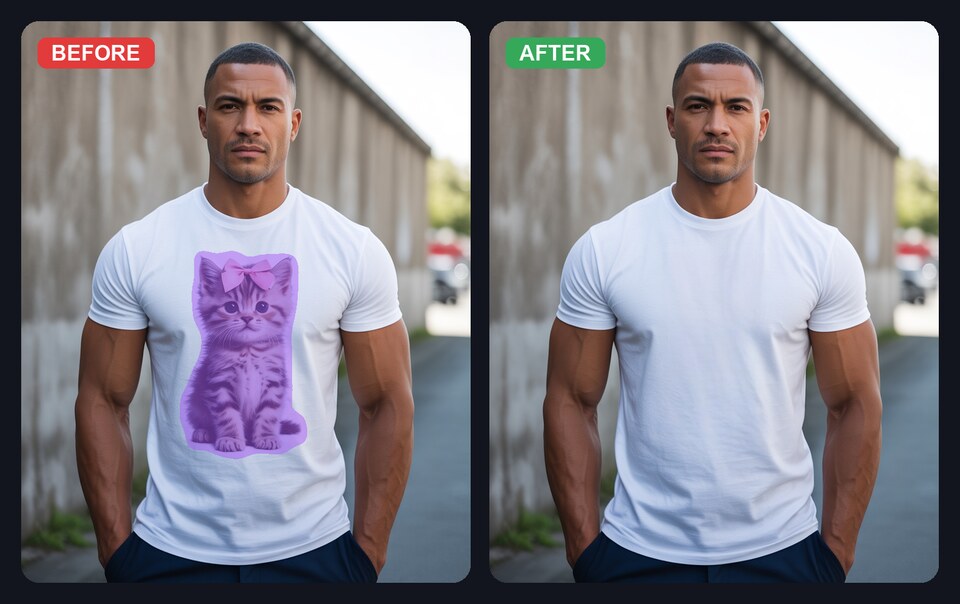
A cat logo painted over and removed from a T-shirt. The AI reconstructs the fabric texture behind it.
How to remove an object from a photo
- Open your photo in wipe.photos.
- Paint over the object, text, or logo you want to remove.
- Download the cleaned-up result.
You can also paste an image directly from your clipboard or drag and drop a file.
What it works well for
- Logos and graphics on clothing, products, or signs.
- Power lines and telephone wires in landscape photos.
- Text you own and are allowed to remove.
- Signs and street clutter that distract from a scene.
- Stray objects you want out of the frame.
It works best when there is detail behind the object: fabric, grass, pavement, water, or a busy street scene. A large object against a blank wall gives the tool less to reconstruct.
Why use wipe.photos
- Your photo stays private: the editing happens in your browser, not on our server.
- No account or watermark: open a photo, make the edit, and download it.
- Free to use: there is no usage cap.
- Built on LaMa: an open-source inpainting model from Samsung Research, licensed Apache 2.0.
Frequently asked questions
Does it work on any object?
Not equally well. It has the best chance when there is texture or detail behind the object: a landscape, fabric, pavement, or a street scene. A blank wall gives it much less to work with.
Is the photo uploaded anywhere?
No. The editing happens in your browser via WebAssembly or WebGPU. Your photo stays on your device.
Can I remove text or a watermark?
Yes. Paint over the text or watermark and the AI fills it in. Note: you should only remove watermarks from images you own or are licensed to modify.
Removing a person? See how to remove people from photos.