Remove a Person from a Photo Online
A photobomber in the background. A stranger crossing a travel photo. Paint over the person, and wipe.photos rebuilds the area behind them. Your image stays in your browser the whole time.
Remove a person from a photo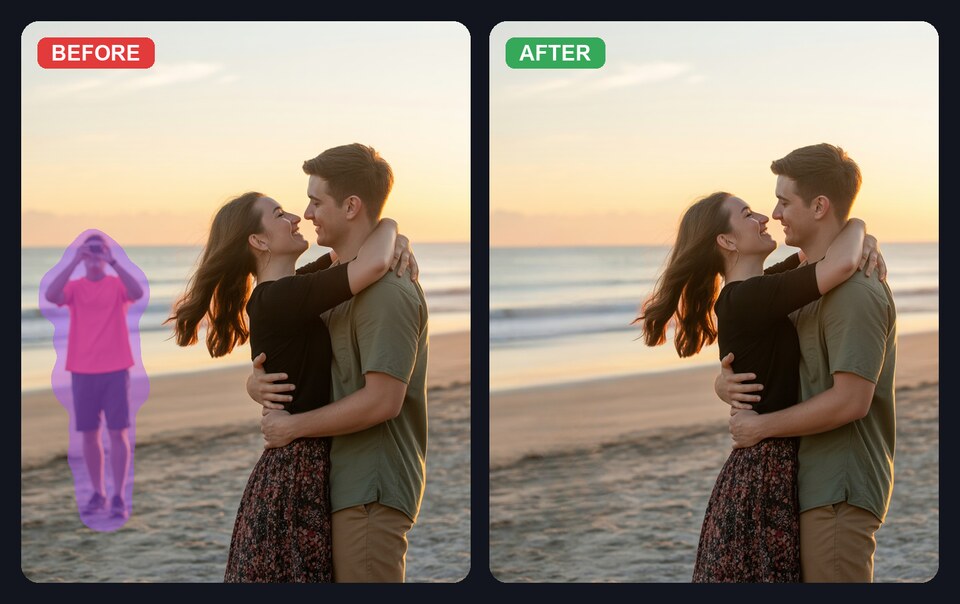
Paint over the person you want to remove. The AI fills in the background.
How to remove a person from a photo
- Open your photo in wipe.photos.
- Paint over the person you want to remove.
- Download the cleaned-up result.
You can also paste an image directly from your clipboard or drag and drop a file.
Why use wipe.photos
- Your photo stays private: the editing happens in your browser, not on our server.
- No account or watermark: open a photo, make the edit, and download it.
- Free to use: there is no usage cap.
- Built on LaMa: an open-source inpainting model from Samsung Research, licensed Apache 2.0.
Results are best when there is enough background detail for the tool to rebuild: sand, grass, pavement, water, or a crowd. A person standing in front of a blank wall is harder.
Frequently asked questions
Does it work for group photos?
Yes. Paint over one or more people and the AI attempts to fill in the area behind them. Results depend on the complexity of the background.
Is my photo uploaded anywhere?
No. The editing happens in your browser via WebAssembly or WebGPU. Your photo never leaves your device.
Do I need to install anything?
No. It works in modern browsers on desktop and mobile. The first visit downloads the model once and saves it in your browser.
What if the result does not look natural?
Give it a little more of the area around the person, then try again. It works best when there is texture or detail behind them, such as sand, grass, pavement, water, or a crowd, rather than a large blank surface.
Remove a person from your photo
Removing something other than a person? See how to remove objects from photos.